


Success Story
Health

How Field Case Managers cuts admin work and billing friction
$594,000
cumulative operating cost savings over 18 months
264
hours saved per year

Company Size
30+
Company Industry
Health
When we needed changes, we weren’t filing tickets and waiting weeks. We could review everything in one dashboard, confirm it, and move on. The time saving was obvious fast, and billing went from a monthly scramble to a simple check.
The Problem
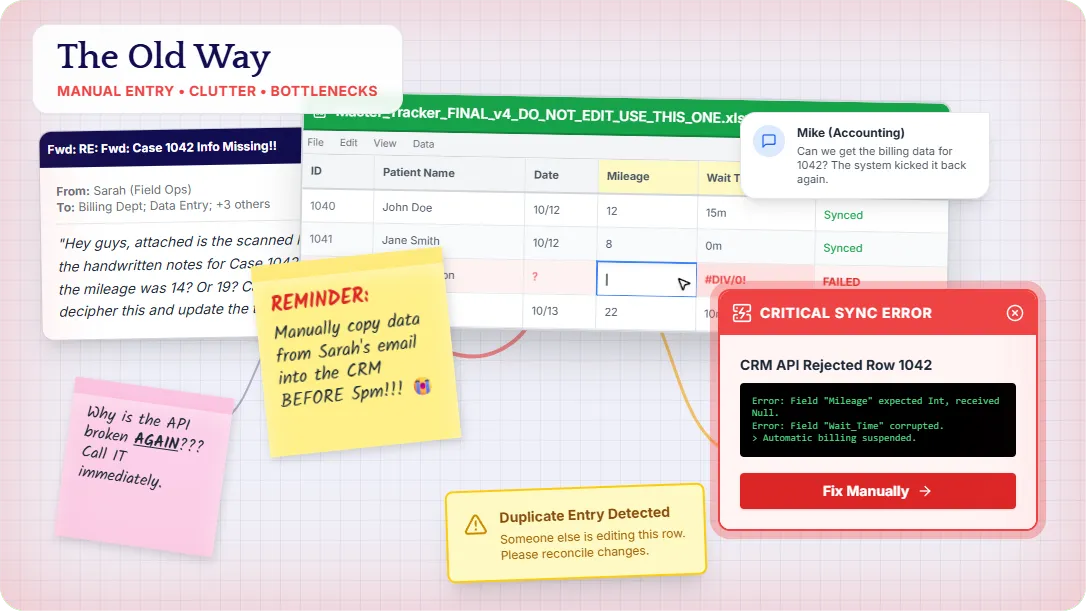
Field Case Managers is a workers’ compensation nurse case management company with 30+ nurses nationwide. Their nurses spend their days coordinating office visits between injured workers, doctors, and insurers, but the work didn’t end when the visit was over.
After every appointment, nurses were stuck with hours of repetitive data entry, pulling them away from patient-facing work. Billing review was messy and inconsistent, which turned end-of-month invoicing into a scramble instead of a quick check. On top of that, they had no reliable appointment confirmation system, leading to preventable no-shows and schedule confusion.
The biggest blocker: their legacy CRM wasn’t built for modern automation or AI integrations, so every improvement had to work around rigid tools and disconnected workflows.
The Solution
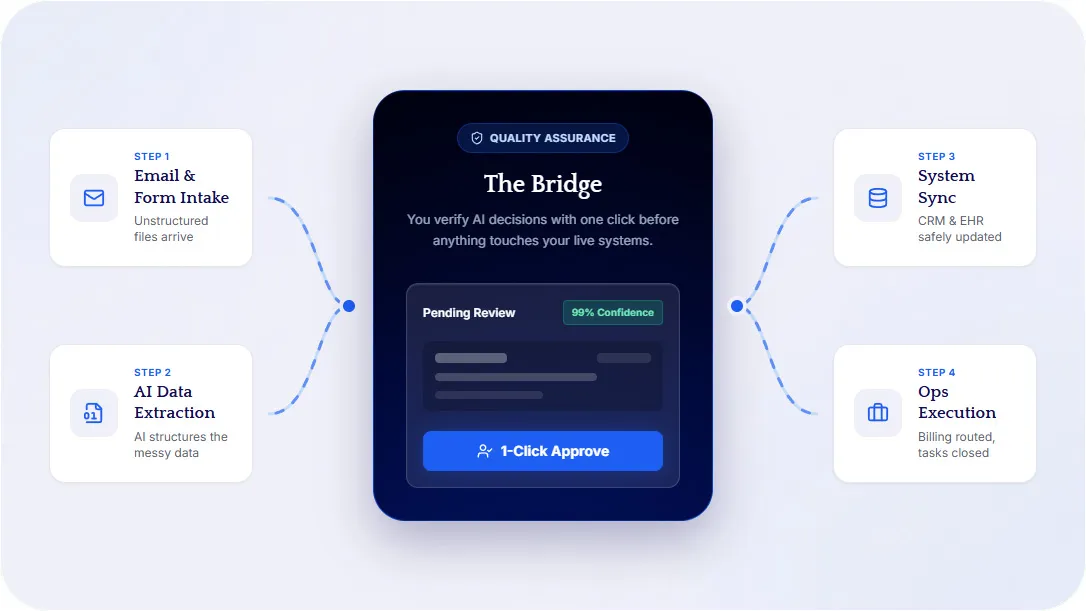
OTR Digital built a centralized dashboard + automation pipeline that works with Field Case Managers’ existing CRM instead of trying to replace it.
Incoming information (especially email-based updates) is automatically scanned and structured, then routed into a single dashboard where staff can review and confirm the details before anything is pushed into the CRM. That verification step keeps the system reliable while still removing the bulk of manual entry.
From there, the workflow expands into the operational pain points:
- Automated appointment confirmations go out by text and email to reduce missed visits and last-minute confusion.
- A location knowledge base supports mileage automation, so travel is tracked consistently without nurses doing extra work.
- Wait time and expenses are captured in a standardized way, making billing review cleaner and faster.
The result is a workflow that feels modern on the front end, while still integrating cleanly with a legacy CRM in the background.
Questions
Common questions
Short answers to what people ask first.
What is CRM automation?
CRM automation is software that moves data into your CRM so people do not retype it. Field Case Managers had a legacy CRM that could not take modern AI. OTR added a dashboard on top: email is structured, a person confirms it, then it syncs. Nurses got 264 hours a year back. The CRM stayed.
What is case management software?
Case management software tracks visits, notes, and billing for teams that coordinate care. Field Case Managers already had a CRM for that work. OTR did not replace it. We built intake, confirmation, mileage, and billing review around it, with a person on the last step. Operating cost dropped $594,000 over 18 months.
How to use AI to optimize your CRM?
Keep the CRM. Automate the copy-paste around it. OTR scans incoming email, structures the fields, and parks them in a review dashboard before anything is pushed. Field Case Managers used that pattern on a rigid legacy system. Appointment texts, mileage, and billing capture came next. The team still confirms before the record is written.
Can AI do data entry?
Yes, when the source is messy and the destination is structured. OTR reads emails and documents, drafts the fields, and waits for a person before writing to the CRM. Field Case Managers used that to cut hours of post-visit entry. AI does the first pass. A person still signs off. The legacy system stays.
How to automate manual data entry?
Start where the notes already land, usually email. Extract the fields, show them in one queue, and write to the system after a person confirms. That is the Field Case Managers build. Nurses stopped retyping after every visit. Billing review became a check instead of a month-end scramble. 264 hours a year came back.

Scale without adding more overhead
Book a demo to see how a custom system would run on your operation, and how we handle implementation so your team uses it.
